Android Auto Installation in Cambridge

⭐ Over 500 Google Reviews (4.9/5) 🏭 11,000sqft State-of-the-Art Facility 🚗 Courtesy Cars Available 👨‍🔧 Installed by Experienced Professionals

Professional Android Auto Installation — Done Right

Which Android Auto system should you choose?

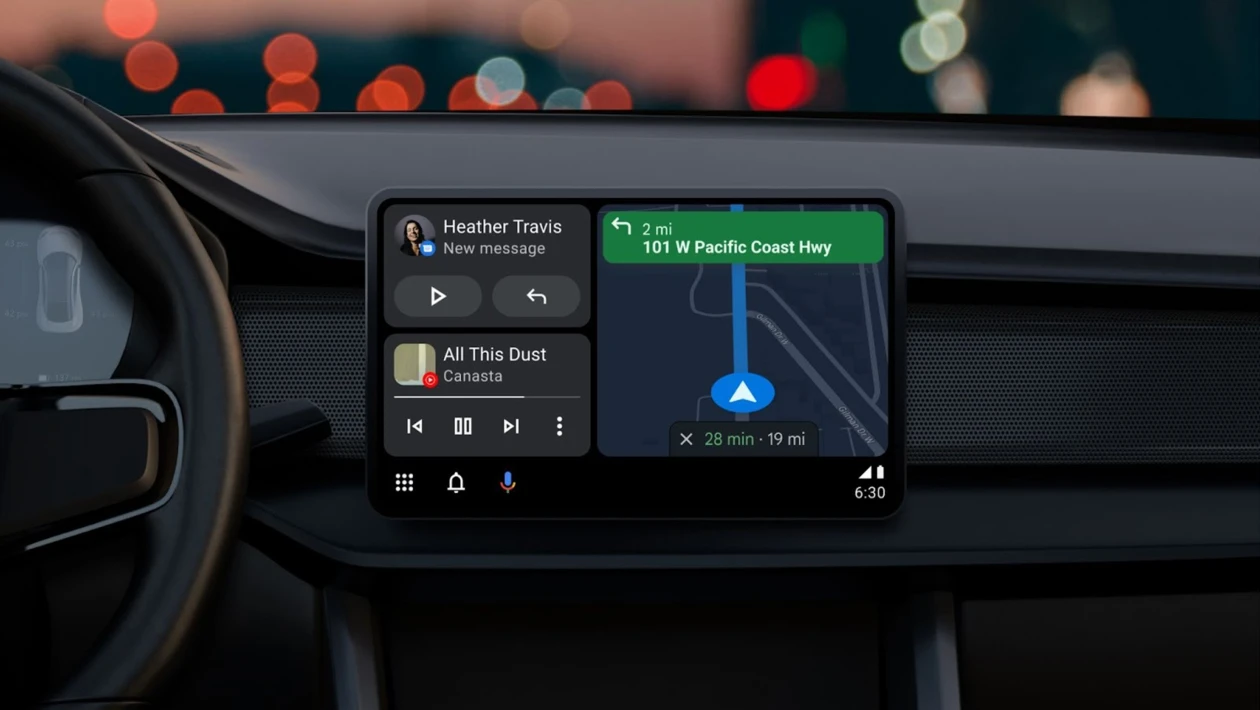
The best Android Auto system depends on your vehicle and the features you need. Options include Android Auto screens, Android car stereos, and full infotainment upgrades with touchscreen and reverse camera support. More advanced systems offer wireless Android Auto and smoother app integration.

How to choose the right Android Auto installer

A professional Android Auto installation ensures safe integration and reliable performance. Choose an installer with vehicle-specific experience and proven compatibility checks.

At CBS Automotive, we provide expert Android Auto installation in Cambridge, carried out by experienced technicians in our 11,000sqft workshop.

Installation time & workshop standards
A professional Android Auto installation typically takes 4–7 hours, allowing the necessary time for careful fitting, testing, and configuration. All work is carried out in our 11,000sqft state-of-the-art workshop, with dedicated Android Auto installation bays and secure component storage. This controlled environment ensures a higher standard of finish and reliability compared to mobile installations.

Google Assistant

Navigation

Communicate

Entertainment

Voice Recognition
Google Assistant excels in understanding natural language and voice commands. It can accurately interpret and respond to spoken queries, allowing users to interact with their devices in a conversational manner.
Contextual Awareness
Google Assistant is designed to understand context, making it capable of carrying on contextual conversations. It can remember previous queries and provide relevant follow-up responses. For example, you can ask, "Who directed The Dark Knight?" and follow up with "What other movies did they direct?" without needing to mention the director's name again.
Multi-platform Availability
Google Assistant is available across a wide range of devices and platforms. It can be accessed on smartphones, tablets, smart speakers, smart displays, smartwatches, and even in some cars. This multi-platform availability ensures that users can access Google Assistant wherever they need assistance.
Personalized Recommendations and Assistance
Google Assistant leverages user data and preferences to provide personalized recommendations and assistance. It can suggest tailored news updates, recommend restaurants based on your preferences, offer commute suggestions, and provide personalized reminders and notifications.
Integration with Third-Party Services
Google Assistant integrates with numerous third-party services and apps, expanding its functionality and capabilities. This integration allows users to perform tasks like ordering food, booking rides, controlling smart home devices, sending messages through various messaging apps, and much more.
Real-Time Traffic Updates
Android Navigation provides real-time traffic information, allowing you to stay informed about congestion, accidents, and road conditions. It suggests alternative routes to help you avoid traffic and arrive at your destination more efficiently.
Voice-Guided Turn-by-Turn Directions
Android Navigation offers voice-guided turn-by-turn directions, ensuring that you can focus on the road while receiving clear instructions for upcoming maneuvers. This feature allows for a safer and more convenient navigation experience.
Integrated Google Maps
Android Navigation integrates seamlessly with Google Maps, providing access to detailed maps, points of interest, and comprehensive search capabilities. You can easily find nearby businesses, restaurants, gas stations, and other important locations.
Offline Maps
Android Navigation allows you to download maps for offline use, which is particularly helpful when traveling in areas with limited or no internet connectivity. Offline maps ensure that you can navigate even when you don't have an active data connection.
Integration with Google Assistant
Android Navigation is tightly integrated with Google Assistant, enabling you to control and interact with the navigation system using voice commands. You can ask for directions, search for places, add stops along your route, and perform other navigation-related tasks hands-free.
Hands-Free Calling
Google Assistant enables hands-free calling, allowing you to make phone calls without physically interacting with your device. Simply use voice commands to ask Google Assistant to make calls, dial specific contacts, or even call local businesses. This feature promotes safety and convenience while on the go.
Voice-Activated Messaging
Google Assistant allows you to send and receive messages using just your voice. You can dictate messages to Google Assistant, and it will transcribe and send them to your desired contacts through messaging apps like SMS, WhatsApp, or other supported platforms. This feature makes it easy to stay connected while keeping your hands free for other tasks.
Chat App Integration
Google Assistant integrates with various chat apps, providing seamless access and interaction. You can use voice commands to send messages, read incoming messages, and even listen to messages read aloud from supported chat apps. This integration ensures that you can manage your conversations and stay connected across multiple messaging platforms using the power of your voice.
Media Portability
Android Entertainment allows you to take your media, such as music, audiobooks, podcasts, and videos, with you on the go. With support for various file formats and streaming services, you can enjoy your favorite entertainment content wherever you are.
Voice-Controlled Operation
Android Entertainment offers voice control functionality, enabling you to control your media using voice commands. You can use your voice to play, pause, skip tracks, adjust volume, and perform other media-related actions, providing a convenient and hands-free experience.
Personalized Experience
Android Entertainment is designed to deliver a personalized experience tailored to your preferences. It offers recommendations based on your listening and viewing habits, allowing you to discover new content that aligns with your interests.

Frequently Asked Questions

1What is Android Auto?
Android Auto lets you connect your Android phone to your car’s infotainment system, giving you hands-free navigation, calls, messages, and music while driving.
2Is my car compatible with Android Auto?
Android Auto is compatible with most modern vehicles. If you’re unsure, contact us and we’ll confirm compatibility before installation.
3Do I need a new screen to use Android Auto?
Not always. Depending on your car, we can install an Android Auto screen, upgrade your head unit, or integrate it into your existing infotainment setup. If you’re comparing options, see Radio Upgrades.
4What’s the difference between Android Auto and Apple CarPlay?
Android Auto is designed for Android phones, while Apple CarPlay is for iPhone users. You can compare both options on our Apple CarPlay page.
5How long does Android Auto installation take?
Most Android Auto installations are completed the same day, typically within 4–7 hours, depending on the vehicle and system.
6Can Android Auto work with cameras or sensors?
Yes. Many Android Auto systems support reverse cameras and parking aids. Learn more about Parking Cameras and Parking Sensors.
7Can I use Google Maps or Waze with Android Auto?
Yes. Android Auto supports Google Maps and Waze for real-time navigation and traffic updates.
8Will Android Auto affect my car’s warranty?
No. All installations are carried out using vehicle-specific methods designed to maintain safety and reliability.
9Can I use Android Auto for navigation without an internet connection?
Android Auto relies on your smartphone's data connection for real-time navigation. However, you can pre-download maps for offline use in Google Maps, ensuring you won't get lost in areas with poor network coverage.
10How can I get started with Android Auto installation for my car?
Getting started is easy! Contact our friendly team, and we'll guide you through the process, provide a personalised quote, and schedule a convenient installation appointment to bring the power of Android Auto to your car.

Enhancing
auto functionality
& aesthetics.

You may also like
How are we different?

  • Family Business

    • Secure Facility

      • Certified Professionals

        • Hire Cars

          • Awesome Coffee

            • Superb Reviews

              Help is here. Whenever and however you need it.

              Choose a service with one on one with a specialist. Online or at our site.